Corporate Social Responsibility: WORLD ELDERS DAY: OCT 1st from TISS students

“Service to others is the rent you pay for your room here on earth – Muhammad Ali”

Social Responsibility

Corporate Social Responsibility has always been a key factor for every team member associated with Techdivine Creative Services.

This time one of our friends Ms.Dobani, shared with us something that was close to her heart and a very important aspect of life that many a times we tend to have ignored even without our own knowledge.

One of our team members had a long conversation with Ms.Dobani and we mutually shared our involvements across various NGO works over the years.

Which is what brought us today to share this important date.

Today on 1st October, we celebrate the very reason for our existence here on earth with “WORLD ELDERS DAY

Social Corporate Responsibility World Elders Day

World Elders Day

The TISS group (Tata Institute of Social Sciences) batch of “TISS Gerontology – Batch 2009-2010” has prepared a wonderful presentation that would take just few moments from your precious time to share something that is extremely valuable and very much in need of ATTENTION not in any other way, but in the form of your thought and your concern for the same, that’s all.

We are sure that you would take few seconds of your time and go through this wonderful presentation on WORLD ELDERS DAY and share it with your friends too.

Always remember, Life will give you back everything you have given to it. So care while you share!

(You can download the Presentation from the link below and do keep your speakers on, if you can too)

Go To Download Page:
CLICK HERE

External / Related Links:

TISS

Social Corporate Responsibility Blog Post

Making the moments count

Have a wonderful life ahead.

Regards

Admin
Techdivine Creative Services

Instant Google: Powering search engine with Keyboard navigation technology

Instant Google powering search engine with Keyboard navigation

Google Logo

Google

The power packed Google search engine does it again. It has delivered what it promised. Google had quoted earlier this year that soon we will search what you are ‘thinking’ and that is what they have done.

creative instant

Google instant technology has powered the world of it’s search engine with just the magic of Keyboard navigation technique.

The new and amazing Google Instant is one of the best search engine enhancements that suggests results ‘even as you start to type’. It’s pure technology growing rapidly under the influence of ‘keyboard navigation’ No more waiting to use the mouse to click the options or hit on search to see your results.

How does it Work:

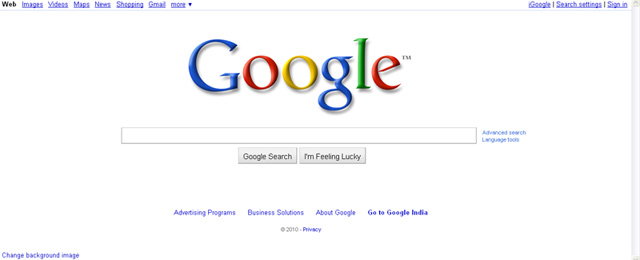
1. Let’s say you are on Google and your page looks like this:

google search engine

Google Page

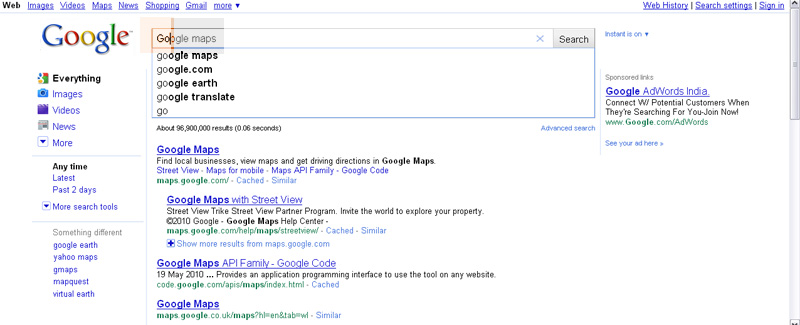
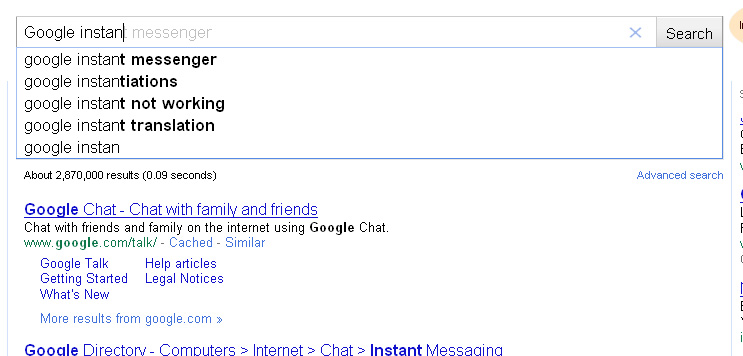
2. You Punch in your first letter of your word that you are looking for and the screen jumps to the search results page as it simultaneously suggests searches for you:

Google instant quicker search engine results

Search engine keyword suggestions

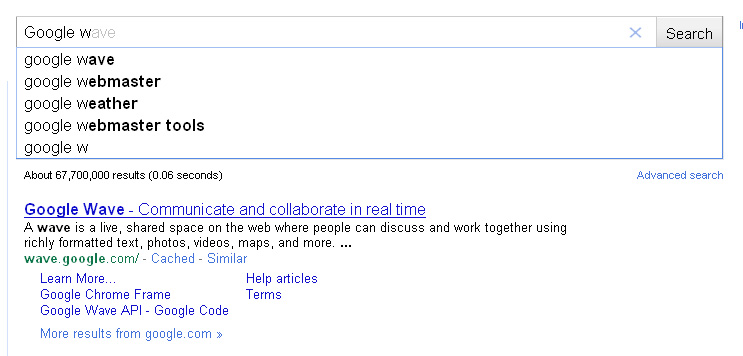
3. Note: As you keep typing the suggested links / results keep changing

Google search engine suggestion

Google search instant 2

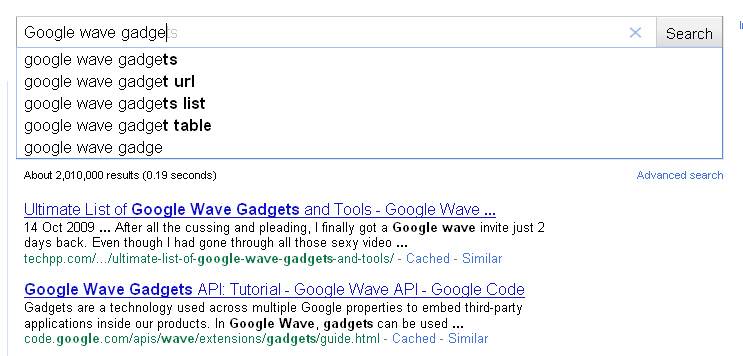
Both the suggestions: First suggestion in Grey Text as you keep typing and the second drop down suggestions below with constantly changing link / landings

Google instant search engine results three

Google quotes on their blog, ‘Our key technical insight was that people type slowly, but read quickly, typically taking 300 milliseconds between keystrokes, but only 30 milliseconds (a tenth of the time!) to glance at another part of the page. This means that you can scan a results page while you type.’

The key benefits:

  • The results take you through as you type the letters: This is amazing. For instant, when you are on the GOOGLE page and you try to enter the first letter, it automatically jumps to the selection search engine display page wherein it starts suggesting based on the first letter itself.
  • Amazingly quick results based on predictions, Google save 2-5 seconds per search.
  • Double Enhanced predictions: One prediction is shown in grey text directly in the search box and the other are the drop down multiple options for you to choose from.
  • You do not have to hit the Enter key or click with your mouse, just keep typing, looking, reading and Woolah, your results are in front of your screen.

GOOGLE INSTANT:

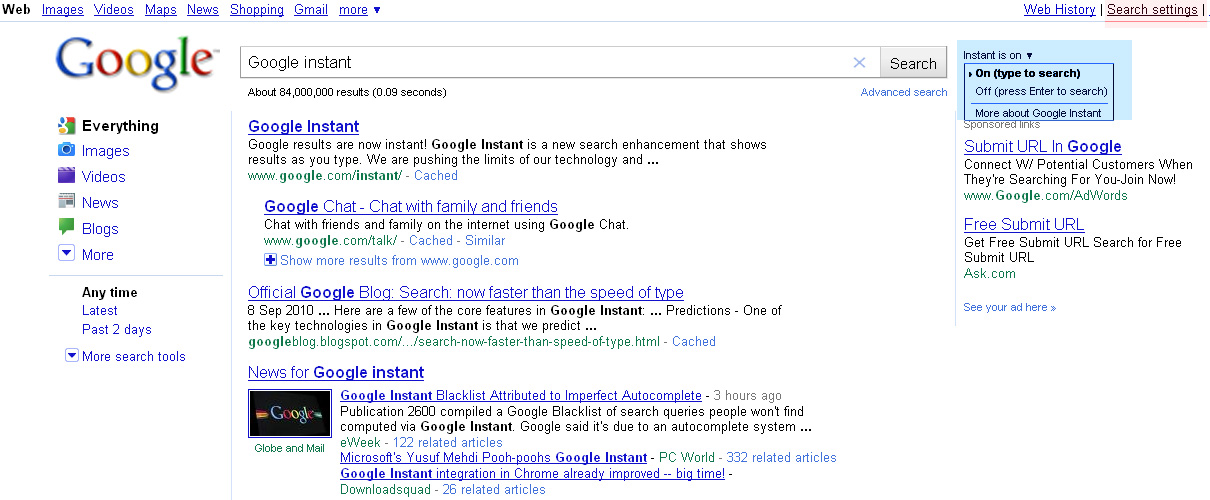
Now “WHAT IF” you DO NOT WANT your google page to guide or suggest as you type. Simple. Click the link next to the search box or go to your preferences page for the options (both options as shown in the highlighted section in the image below)

how to turn off google instant

For others, well, go ahead, search your queries away instantly and land right on spot!

Happy learning.

Stay Connected.

social media marketing creative writer blog

Subscribe for FREE Updates

Subscribe for FREE and stay updated with us –  CLICK HERE

Connect with Us:

Ananth V

Techdivine Creative Services

<<<Tweet with Me @ananthv9>>>

Related Posts:

Google: Search a lot faster, real-time

Integrating SEO with Social Media Monitoring Campaigns

Free Google Tools, every Marketing expert and web developer should use

Google Wave – Part 2

Subscribe to RSS Feed Twitter @Techdivine