Google includes sign language app in Hangouts for challenged users
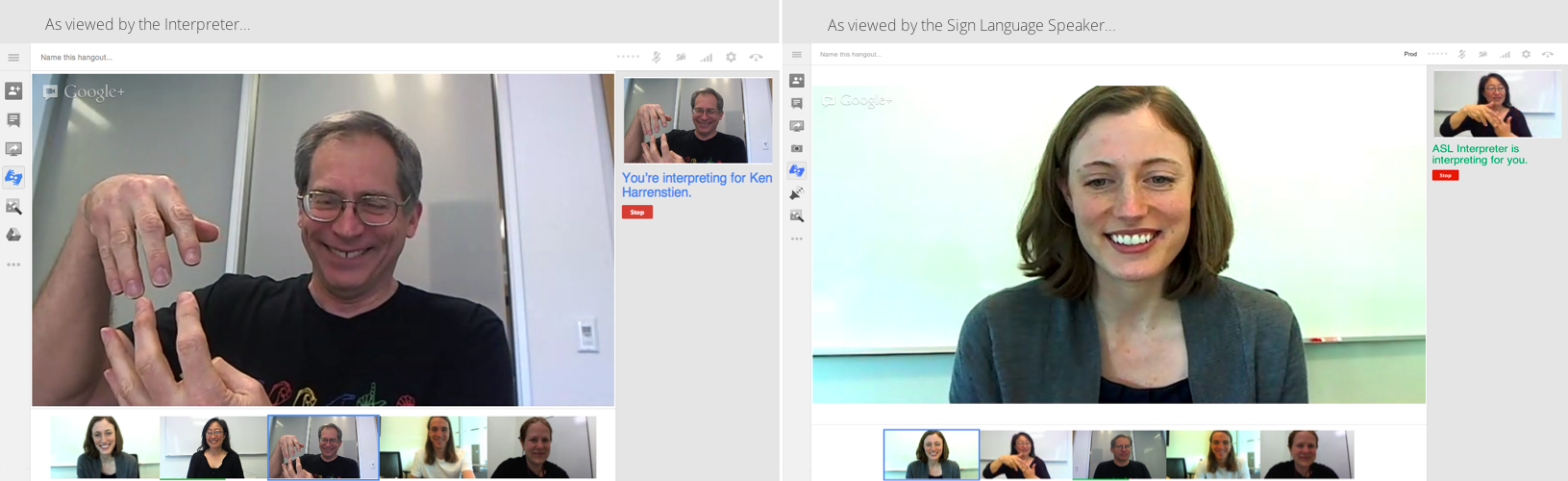
Google has always made its services available for a broader audience. Google Hangout especially has a lot of features for deaf and dumb users so that their video chat experience is simple and comfortable. For eg: Hangout Captions is an app that that connects live transcription services directly into a Hangout. Users can read a transcription of what is being said in a pane on the right side of the window in real time.
Now they have added a Sign Language Interpreter App to its accessibility features. Using this app, users can invite interpreters to their hangout who will communicate using sign language. The interpreters window will be displayed in the top right corner of the hangout and the focus will be shifted to them whenever they speak for a user. This will work both ways. The interpreter can speak for a user and also translate what other people are saying into sign language.
Apart from this, for people who can’t use the mouse, Google has released an updated set of shortcuts which can be accessed easily by pressing “?” when in an Hangout. Windows and Mac users can view the complete list of shortcuts on Google’s support page.
Including this accessibility features, Google has proved that its not just aiming for the majority, but also the minority of users. No other video chat provider might have so many provisions for thechallenged. This can only make Google Hangouts more popular and earn the goodwill of its social base. Have you made use of any of these services? How has your experience been? Do share your views here with us.
[Img Src:”Anna Cavender on Google+“]
You can connect with us here – TECHDIVINE CREATIVE SERVICES on Facebook — Twitter— LinkedIn — YourSMQ on LinkedIn — Google Plus —- Slideshare — Android App.
Related Posts:
- Hangouts in Gmail now available in India
- Type in Hindi with Google’s Transliteration keyboard for Android
- Play Super Sync Sports using Google Chrome on your desktop and mobile
- Google Plus Sign-In ready to take on Facebook Connect
- The Chromebook Pixel from Google is here
- Google Plus renames Circles as Find Friends


