Type in Hindi with Google’s Transliteration keyboard for Android

Type in Hindi with Google’s Transliteration keyboard for Android

Google has just released a new app into the Play Store which makes typing in the Devanagari script very simple. The keyboard app is compatible with all phones running Froyo and above so rest assured that there won’t many people who are left out. Head to the Play Store and download the Keyboard first.

Download Google Hindi Transliteration Keyboard from Google Play Store.

Google Hindi Transliteration Keyboard

Now head into “Settings” on your phone, go to “Language and Input” and select the “Google Hindi Input” option. The procedure might vary for different handsets. Now the great feature of this keyboard is that you can type Hindi words in English and the app will show you suggestions in the Devanagari script. For instance, typing “namaste” in English will show you “नमस्ते”. You can also toggle the Transliteration mode to type using an English or dedicated Hindi keyboard. You can toggle this keyboard by pressing the globe button at the bottom. The  transliteration mode can be toggled by clicking the button to the right of the globe.

Google Hindi Transliteration Keyboard Devanagari Script

Google seems to be slowly focusing on the Indian market by making Google Play Books  available first and now this dedicated keyboard for users. We can only hope that other Google services like Music, Movies and the sale of Nexus devices arrive in the Play Store soon. Try out the app and add your comments to this post in Hindi.

Download Google Hindi Transliteration Keyboard from Google Play Store.

You can connect with us here – TECHDIVINE CREATIVE SERVICES on Facebook — Twitter— LinkedIn — YourSMQ on LinkedIn — Google Plus —- Slideshare — Android App.

Related Posts:
Play Super Sync Sports using Google Chrome on your desktop and mobile

Play Super Sync Sports using Google Chrome on your desktop and mobile

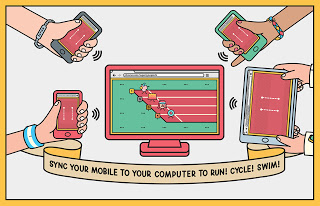
Google Chrome is a very powerful browser and the Chrome development team keeps coming up with different experiments periodically to showcase its capabilities. This time they bring to us a fun game called “Super Sync Sports”. This game utilizes your smartphone or tablet as a controller to play a game on the desktop. The mobile device is synced over wifi to your desktop.

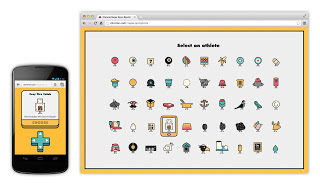
Select athlete for super sync sports

The procedure itself is very simple and the game loads of fun. As you can see from the video above, the animation has a real fun tone to it. The game has three sports for you to compete in, running, swimming and cycling. Up to 4 other players can join in on the fun. First of all head to  chrome.com/supersyncsports on your desktop. Choose which game you wanna play and the number of persons ready to compete. Then point the Chrome browser on your phone or tablet to g.co/super where you will need to enter a code that will be generated on the desktop site. That’s all you need to do to sync your device.

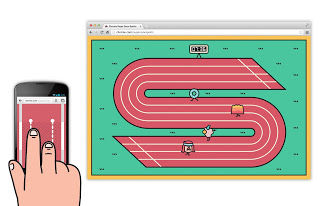
Race Track in super sync sports

The fun part starts from here. Select your athlete from the huge list at your disposal. Don’t forget that you don’t need your mouse now. Your mobile device will have an arrow pad to help you make your selection. You will be shown what action to perform on your mobile screen to make your athlete run, swim or cycle respectively. You can even share your final scores to the various social networks.

Multi Player in super sync sports

While the games are incredibly fun, the Chrome team is also trying to showcase the technology behind it. There already a few apps like Airdroid which use this concept to help you wirelessly transfer your files. Other apps will probably pop up over time which will utilize this concept for other functions. If you are interested in the technical side of what concept this is based on, the following information was posted on the Google Chrome blog:

It uses the latest modern web technologies, including HTML5 features such as WebSocketsfor real-time gaming synchronicity on desktop and mobile, and Canvas and CSS3 for rich and engaging visuals.

Chrome Super Sync Sports is available for Chrome v15 and above, and for Android 4.0+ and iOS 4.3+ devices. Give the game a try and tell us your high score. Ready, steady, GO!

You can connect with us here – TECHDIVINE CREATIVE SERVICES on Facebook — Twitter— LinkedIn — YourSMQ on LinkedIn — Google Plus —- Slideshare — Android App.

Related Posts:
Subscribe to RSS Feed Twitter @Techdivine