Firefox 18 released with retina display support
The latest version of Mozilla’s browser, Firefox 18 is now available for download. This version see’s more than 21 updates with around 300 bug fixes. Mozilla assures that Firefox 18 makes Web apps and games perform up to 25 percent faster. You can check this claim out by playing BananaBread a fun 3D Web game created by the Mozilla Developer Network and powered exclusively by HTML5, WebGL and JavaScript.
[img src:”Mozilla blog“]
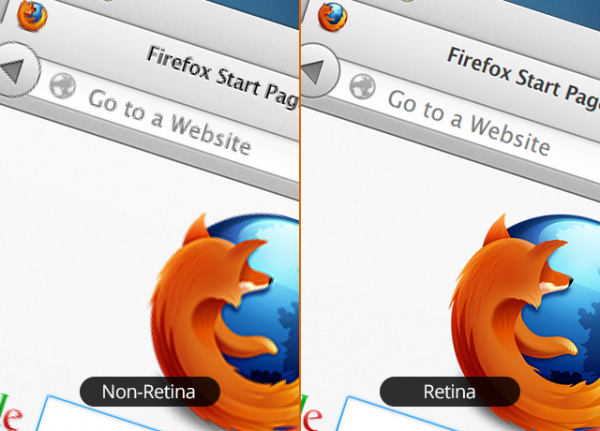
The desktop version also brings retina display support for a crisper and sharper internet experience. Apart from this the new Ionmonkey javascript compiler boosts the browser performance giving you the earlier mentioned performance when playing games, watching HD videos or loading heavy pages. Animated themes have been disabled from this version of Firefox as Mozilla claims that they were slowing the browser. On the security front, users will now have the option to block any unsafe content on https sites.
The Android version of Firefox will now offer search suggestions as you type in the “awesome bar”, you can opt out of this feature if you choose. Mozilla has assuredthat these search suggestions are conducted over a secure connection to protect user data. New phishing and malware filters have been incorporated as well to protect users against malicious websites.
Firefox still needs to catch up with Google’s Chrome and Microsoft’s Internet Explorer in terms of market share. Hopefully their 6 week update cycle will help them integrate new features more rapidly and push them to the front. What browser do you use and which one do you prefer? SHare your thoughts with us here.
Download Firefox for your desktop.
Download Firefox for your Android device.
Let’s connect on social platforms with Brand Techdivine Creative Services:
- Techdivine Creative Services on Facebook
- Techdivine Creative Services on Twitter
- Techdivine Creative Services on Google Plus
- Techdivine Creative Services Website
- Your SMQ Social Media Quotient for BRANDS on LinkedIn
- Techdivine Creative Services on LinkedIn
- Your SMQ Social Media Brand Quotient Android App
- Social Media Quotient YourSMQ On SLIDESHARE
Related Posts :
- Google Plus lets you zoom into and pan images on the desktop
- Facebook Pages Manager launched for Android
- Consumer Electronics Show 2013 begins at Las Vegas
- Voice Messaging in Facebook Messenger
- Ubuntu OS for Smartphones
- Google lets you share your New Year Resolutions globally
- NASA introduces new badge on Foursquare
- Optimize the time spent on Facebook by streamlining your news feed