Make a backup of your photos on Instagram
Instagram recently made some changes to its terms of service and privacy policy which caused a lot of uproar among users. The language used was quite vague and the legal terminology did not make much sense to normal users. Some sites even reported that Instagram would have exclusive rights over your photos and would be free to sell them to advertisers and earn revenue. All this prompted Instagram’s co-founder Kevin Systrom to clarify what the terms actually meant.
“Instagram has no intention of selling your photos, and we never did. We don’t own your photos – you do.”
The terms of service were duly updated to appease users and can be read here.
Still a large number of users jumped ship to other apps and sites like Flickr. In any case it would be safe to have a backup of all your photos on Instagram. Instaport lets you do just that.
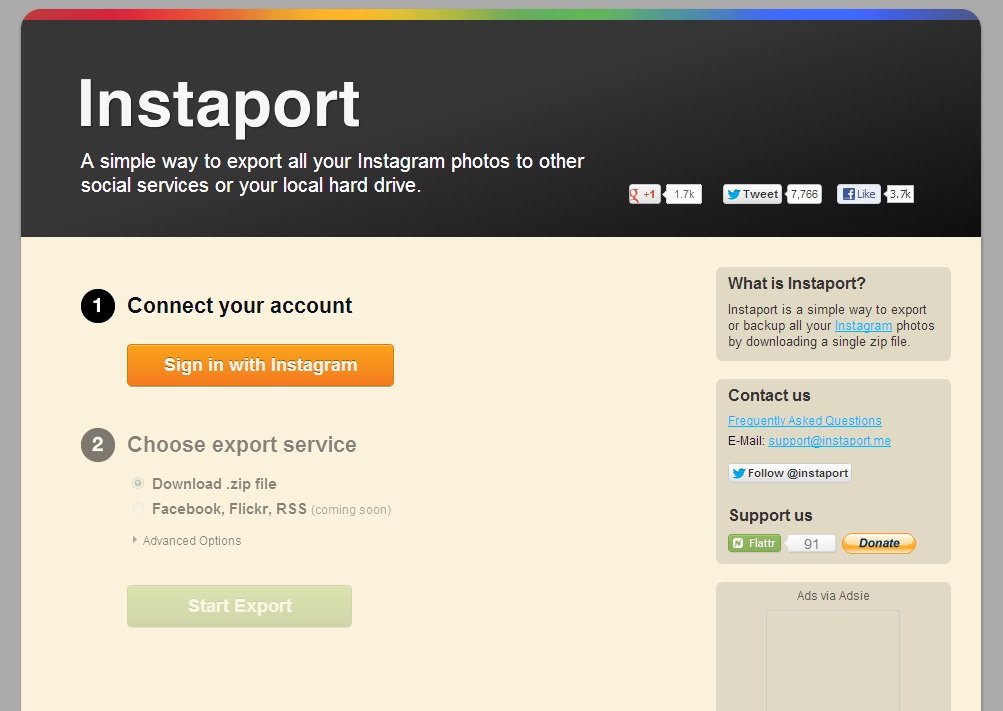
Just sign in with your Instagram account and Instaport will pull all your photos from Instagram and make it available for download in a zip file. You can extract this zip file usin winzip or winrar and upload it to other sites or upload it to a cloud storage of your choice. More features will be available in the future including exporting your photos to othe sites like Facebook and Flickr.
In case you are looking for Instagram alternatives you can check out our Top apps roundup for various smartphones and make a choice.
Will you be quitting Instagram and migrating to another service or do you still have faith in it? Let us know your views in the comments.
Let’s connect on social platforms with Brand Techdivine Creative Services:
- Techdivine Creative Services on Facebook
- Techdivine Creative Services on Twitter
- Techdivine Creative Services on Google Plus
- Techdivine Creative Services Website
- Your SMQ Social Media Quotient for BRANDS on LinkedIn
- Techdivine Creative Services on LinkedIn
- Your SMQ Social Media Brand Quotient Android App
- Social Media Quotient YourSMQ On SLIDESHARE
- Email: socialmedia@techdivine.com
Related Posts :
- New quick privacy settings option on Facebook
- 12 items to gift this Christmas
- Twitter to let you download your whole Tweet archive
- Simple tips to enhance your Facebook experience
- Marketing media tools for social media quotient and brand monitoring with ROI
- Foursquare revamps Explore Tab
- Social media quotient for brands on Slideshare
- Angry Birds celebrates 3rd birdday with 30 new levels and more