Foursquare updates Android app with new UI & layout
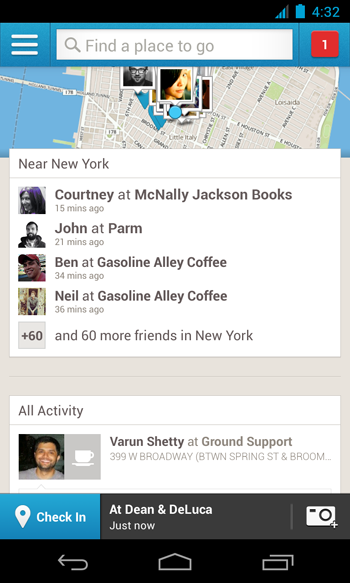
Foursquare has updated their mobile app for Android with some big changes to the UI and layout. The update is focused around three main changes as listed below.
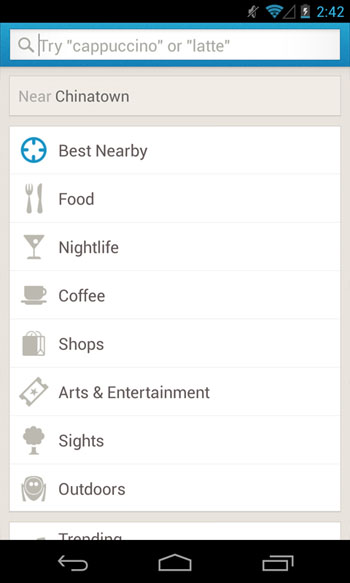
The first major change is to the “Explore” tab. It can now be found via a persistent search bar at the top of the app. You can tap and input a search option for food, hotels or search by the provided categories. Alternatively, you can also tap on “Best Nearby” to discover interesting places around you.
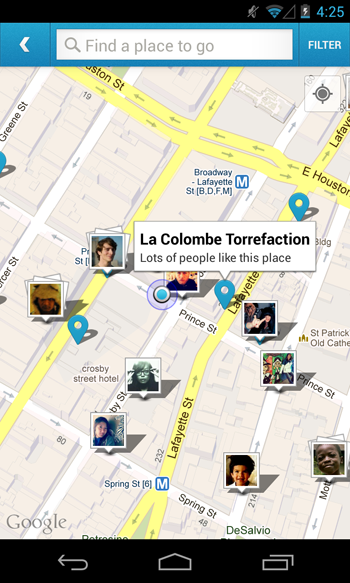
The second major change you will find as soon as you open the app is the map at the top. Tap on this map to expand it and explore other places nearby or find your Foursquare friends who might have checked in close by. You can zoom in or out and explore the map to find suggestions for places based on your interests.
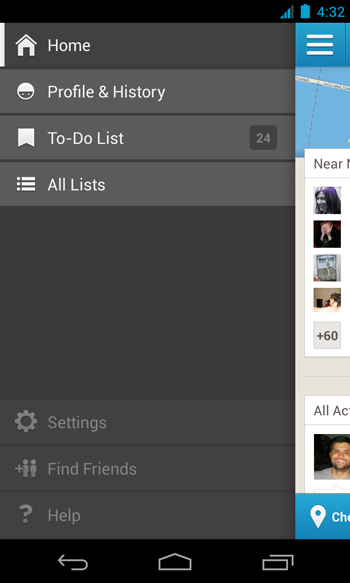
Finally, users will no more have to swipe through the app as all options have been consolidated in a drawer which can be revealed by clicking on the Menu button on the top left of the screen. You can access your profile, edit your lists and change your setting easily from this drawer. Apart from these changes, one other major change is that the “Check-In” button which used to reside in the top right of the screen has been moved to its diagonally opposite corner. This button is now situated at the bottom left corner of the app.
These updates will be rolled out to all users in the following weeks. Foursquare is promising more updates on its blog including an even better personalized map on the home screen. Overall this update promises smoother search, easy maneuverability, the ability to quickly find friends and consolidated settings among others. What are your first impressions about this update? Share your views in the comments below.
Download the Foursquare Android app from the Google Play Store.
[Img srcs:”Foursquare Blog“]
You can connect with us here – TECHDIVINE CREATIVE SERVICES on Facebook — Twitter — LinkedIn — YourSMQ on LinkedIn — Google Plus —- Slideshare — Android App.
Related Posts :
- Foursquare launches business companion app
- NASA introduces new badge on Foursquare
- Pinterest updates Android app with group boards
- Facebook launches video channel for developers
- Google announces Mapathon to create better maps for India