Google India business event in Mumbai

AT Google India Event in Mumbai – Business day Event

gindia

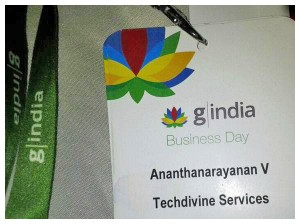
It’s always exciting to be Invited by Google, especially if it’s an Invite for Google India’s first ever – business and brands event in Mumbai. More so, it was wonderful because, I was luckily in Mumbai this time and not on my routine travels across.  So I made it a point to be a part of this first ever Google India Mumbai event or more popularly known as “gindia“.

Here are some event highlights and core updates from the first day of the event – “Business day at gindia”

 GIndia Event top Highlights:

– Spectacular engagement integrating Google maps & mobile apps for brands.

Check out an awesome example of this:

“Red Tomato Pizza – The VIP Fridge Magnet” – When HUNGER Strikes

– Intelligent optical character & image recognition using Google Cloud collaboration. For eg. Massive number of users today have smartphones and we keep clicking pictures during travel, so to speak, while on the go. For eg. I have a personal blog dedicated to pictures I click using my mobile phone during my travel  and off-late, due to the cumbersome task involved to tag them, name them, etc I stopped uploading them online as there were just too images be organized or even searched. Using Google cloud, the process becomes very simplified using Intelligent optical character & image recognition integration, wherein all images get added to your cloud and on searching terms like Eiffel tower, leaning tower, Paris etc it automatically shows you images that resemble or match that description. Hassle free organized way of adding images to your collection.

Google Docs: Documents like word, spreadsheet using google docs have been enhanced with powerful features to add scripts, calculations, etc to it too. Moreover, multiple users can log in to a chat system on Google docs and simultaneously make edits to their documents, conversations, get status updates and messages updated online across different time zones too. The best part is, even if a user goes offline in-between the conversation, he or she gets all the update real-time when online. A wonderful way to “collaborate and work” across places & time zones. Google docs giving a whole new meaning to working together at the same time

Google Plus Hangout: Doing more than just hanging out. Using Google Plus hangout, with teams at work and at the same time adding apps to your Google Plus, collaborating tasks in real-time saves so much time, energy and resources too. This is not merely a social networking site. It can empower you to do so much more.

– Every app creates collaboration in the context of work itself.  This is the best part of using google apps. You become part of the process without wasting any time as all your tasks, updates, edits, changes, new ideas and app integration, keep happening in real-time.

Sharing with Caring: Google cloud ensures security, adaptability & ease of real time collaboration: The best part is, it’s awesome for both, personal & business use.

About Google analytics from a Googler: Optimizing Google analytics for products with varied ticket size, industries, organic search, adwords. Bottom-line is OPTIMIZE using the power of Google Analytics. Powering up with “intelligence events” in Google analytics, for better control over your adwords & site traffic measurement. Excellent Insights into ROI & conversion process using  “Funnel visualization & Goal Flow” in Google Analytics. Using “custom reports” for specific goals & measurement,.you can share it as a single template too rather than as multiple reports

Google analytics in real life: online checkout A must watch Video:

Google Plus: 250Mn Plus “Google Plus” profiles &  1Mn Plus  “Google Plus” Brand pages & growing

– How a “plus one” today gives you the power to be “discovered online”. G+ integration for business is an obvious choice.

– Also, how making plus one your social currency is a no-brainer by integrating “+1”  & “G+” icons on website for your brand, increasing visitors, verification chances and more.

Google Place: “Places you love, from people you trust,now that’s a +1” where businesses that encourage constant customer connect, reviews, check-ins etc have a massive chance to win over their competitors.

– An excellent initiative by Google to get every business a free website – “India,get your business online” Program initiative by Google.  ‘India,get your business online’ program so far: 1Lac Plus websites across 7,000 plus cities. All your customers are going online.

About India Get your Business Online – VIDEO:

YouTube: Business for Brands:

Did you know that YouTube has a feature wherein you, as a brand owner or advertiser only pay for engaged ads, viewed over a certain time duration only?

Also, the fingerprint id system is a powerful feature by Google that protects content like music etc on youtube. It either deletes the said video or adds the tag to the original copyright owner’s video or music userid name and sends you a message regarding the violation or edits to your video too. Now, that’s protecting your content online.

Business objectives: Every business for it’s need to not only survive, but also innovate, create more user friendly tools and services, needs to constantly optimize it’s resources, revenues, reduce business day costs, increase ROI but make sure at the end of the day to gratify it’s brand ambassadors.

Did you know: Globally there are approximately 180 Mn domain names, but how many of those are really online & live?

Google Sites: For your FREE Website from GOOGLE

There were lot more resourceful updates that happened during the event, thought of sharing few  of those with all of you.

Conclusion of Highlights: Persuasive content, personal engagement, powerful scale & precise targeting are core for any business to succeed. The strategy is to use appropriate social media new age technology tools with brand marketing strategy and techniques to give that power reach for your brand.

Were you too present at the gindia event? Do share your experiences here. Would love to hear from all of you.

Check out the Mumbai Event Pictures here:  http://goo.gl/Kh0Y8

Have a nice day.

Regards,

Ananth V

Founder & CEO

Techdivine Creative Services

Top 30 apps for Android and iPhone/iPad

Top 30 apps for Android and iPhone/iPad

iphoneandroid google

This is the mega round up of apps for your Android or iPhone. This collection has been divided into different categories with links to the app store or developer website for your convenience. So lets get into it.

  • Games

1. Horn [Paid] :

Horn is a 3rd person 3D adventure game. The game environment is lush with beautiful locales and strange mythical creatures. Needless to say, make sure you are running this on a powerful device to enjoy the  rich experience crafted by the developers.

For iPhone.

For Android.

2. Sonic and Sega All-Star Racing [Paid]:

If you like racing games, especially arcade ones then this game is the perfect stress buster for your weekend. More than a dozen characters from the Sega universe with unique power ups duking it out in go kart race. Oh, and there’s multiplayer as well.

Download link for Apple App Store.

3. Extreme Skater [Free]:

This one’s for the skateboarding enthusiasts. In addition to Jump, flip, turn and grind, you have to avoid obstacles, perform stunts, collect all the meteor fragments and most importantly, survive.

For iPhone.

For Android.

4. Bastion [Paid]:

Bastion is an immersive role playing 2d action  game which was originally launched for the Xbox and PC. It has finally made its way to the iPad. It also supports the retina display on the newer iPad making your game look even more colourful and enjoyable.

Download link for Apple App Store.

5. Avengers Initiative [Paid]:

Any game which puts you in the shoes, or er, jeans of the Incredible Hulk is sure worth checking out. Avengers Initiative promises episodic content with notorious villains like Wendigo, Abomination, The Kronan, and The Skrulls appearing in the first installment. Make sure to not get too much into the spirit and do a hulk smash on your tablet or phone though.

For iPhone.

For Android.


  •  Productivity

1. Speedtest [Free]:

Speed Test

Speed test is handy little app that allows you to measure the upload and download speed of your wifi or 3g /2g network. It has a simple interface and you can also access past records of speeds tests.

For iPhone.

For Android.

2. utorrent [Free]:

utorrent for android

The most popular torrent downloading app on the pc now comes to Android. Download torrents of any size straight to your phone or tablet. A wifi connection is recommended.

Download Link for Android.

3. Flipboard [Free]:

Flipboard is our favorite news aggregator.  You can get content from various sites for various categories presented to you in a clean and elegant format. Whats more, you can also have your news feed from Facebook, Google Plus, Twitter and Instagram pulled into Flipboard as well.

For iPhone.

For Android.

4. Pocket [Free]:

Found an interesting article but on’t have time to read it now? Add it to Pocket. It syncs across all your devices, so you can add a page on your computer and read it on your phone on the way to work.

For iPhone.

For Android.

5. Stumbleupon [Free]:

Stumbleupon

Stumbleupon is the easiest way to find new and interesting content on the web according to your tastes. Stumble across photos, videos, articles, web pages and more. Share what you find on the various social networks or via email.

For iPhone.

For Android.


  • Photography

1. Instagram [Free]:

Instagram

Instagram is the most popular photography app on Android and iPhone thanks to its substantial user base which is the highest than any of its competitors. While the number of filters offered are fewer than many other apps, its strong back end social network  is reason enough to get hooked on to it.

For iPhone.

For Android.

2. Fxcamera [Free]:

Fxcamera

Fxcamera doesn’t have any fancy social network of its own to share to, but it has some really cool filters to boast of like Fisheye, Cartoon and Symmetric. You can try editing an image in Fxcamera and then importing it into Instagram for further editing. Let us know how it worked for you.

Download link for Android.

3. Adobe Photoshop Express [Free]:

When its by the pioneers of photo editing, you hardly question the authenticity of the app. Photoshop Express lets you edit your images and access them from Photoshop.com. Crop, rotate, adjust color, and add artistic effects all while on the move.

For iPhone.

For Android.

4. Pudding Camera [Free]:

Pudding Camera

Pudding Camera stand apart from the rest of the photo editing apps thanks to its quirky interface. You scroll through different camera models or rolls to apply the effect that you want. The Play store description reads that this app can take pictures that might even be better than a DSLR. That claim alone is enough to give this app a try.

For iPhone.

For Android.

5. AfterFocus :

AfterFocus

AfterFocus helps you to bring about a DSLR like quality to your images. You can blur the background by selecting a focus area or add Bokeh like effects. The Play store has a free and paid version of the app with the Pro version offering more features like higher resolution and edge feathering.

For iPhone.

For Android.


  • Communication

1. Viber [Free]:

Viber

Viber allows you to text or call other viber users for free over your wifi or 2G / 3G internet connection. Viber also promises better sound quality than even your GSm network.

Download Link.

2. WhatsApp:

Whatsapp

WhatsApp usually needs no introduction. The most popular messaging service on most mobile platforms, WhatsApp even comes preinstalled on a few Android phones nowadays. While it is a piad app in the Apple App Store, Android users can try it out for a year before buying it.

Download Link.

3.  ChatON [Free]:

ChatON

ChatON is Samsung’s attempt to enter into the fray among WhatsApp and Viber. ChatON also offers most of the features of WhatsApp in addition to a few more,but still for some strange reason hasn’t been able to create the kind of ripple that Samsung expected.

Download Link.

4.  Nimbuzz Messenger [Free]:

Nimbuzz

Nimbuzz is another popular chat client which also offers free calls between Nimbuzz users akin to Viber. But Nimbuzz is supported on more platforms than Viber giving it the edge in this showdown.

Download Link.

5.  Tablet talk [Paid]:

Tablet Talk]

Tablet Talk is an app that lets you tether your phone to your tablet via wifi or bluetooth to send text messages. Features include Caller ID and quick reply popups.

Download Link.

  • Social

1. Stereomood: 

Stereomood helps find music relevant to your mood. It features playlists generated from tags and users’ preferences and changes every day. You can discover new songs and artists according to your mood and add your own to the growing database.

For iPhone.

For Android.

2. Google Plus [Free]:

Google Plus

The Google Plus app has received quite a few updates and is now faster and more aesthetically pleasing on both iOS and Android devices. You can now initiate Hangouts from the mobile app itself and also view the Nearby stream to see what people near your location are saying.

For iPhone.

For Android.

3. Facebook [Free]:

Facebook

The Facebook app for the iPhone recently received a complete code rewrite from the ground up with the developers promising that it is faster and more intuitive to use. Android users will have to wait a while or switch to 3rd party apps for a while.

For iPhone.

For Android.

4. Friendcaster [Free]:

Friendcaster

Users claim that Friendcaster is the app that the Facebook should have been. Fast, intuitive with a well designed layout, no wonder most people prefer it over the official Facebook app.

For iPhone.

For Android.

5. Pinterest [Free]:

You can now finally pin images on your pinboard via your tablets and mobile devices. The app closely mimics the web layout enabling you to feel right at home and get to discovering and pinning your favorite images right away.

For iPhone.

For Android.

  • Travel

1. Google Maps [Free]:

Google Maps recently unveiled turn by turn and voice navigation in India, so that should be reason enough to download this app asap. In case you need another impetus, what do you say about live traffic updates?

Download Link for Android.

2. M-indicator [Free]:

M indicator

M-indicator is the best companion for a frequent traveller in Mumbai. You can get train timings, bus routes and fares for public transport as also movie timings and information about Sodexo outlets.

 Download Link for Android.

3. Map My India:

Map My India promises the most accurate and updated interactive maps of India with house number and street-level detail and step-by-step driving directions from your current location or between any two points in India. The Android app is free whereas the Apple App Store offers a paid version of the app.

For iPhone.

For Android.

4. Waze [Free]:

Waze is a social GPS driving and navigation app that connects you to other drivers. It is a community-based traffic & navigation app where you just have to start the app and drive around and it will contribute real-time traffic & road info to other Wazers nearby.

For iPhone.

For Android.

5. Skyscanner [Free]:

Skyscanner lets you  compare over 1000 budget and scheduled airlines and more than 1,000,000 routes around the world in seconds. Find all flight details from the app itself and share it with friends, family or your colleagues.

For iPhone.

For Android.

DISCLAIMER: App compatibility differs on various devices and apps featured may be supported or not supported on your device. Not all apps featured are free or full versions. None of these apps are associated with us directly or otherwise. In case of any query or issue or rating and feedback, you can reach the app source at the respective links given with each of the apps description.


SUBSCRIBE to our FEEDS Click here & Stay updated with the latest news & updates

Let’s connect on social platforms with Brand Techdivine Creative Services:

Related Posts:

Subscribe to RSS Feed Twitter @Techdivine